First steps
- Open a project. If there is none, the file tree asks for one; you can also pick one of the recent projects on the start screen or use the Open another project button in the tree header.
- Open an agent with
Ctrl+Shift+N. The ones Tutti found installed appear; type to filter and pressEnter. - Work as usual. Each agent is its own terminal inside the window. You can open several, and also edit files, look at git or add MCP servers while they work.
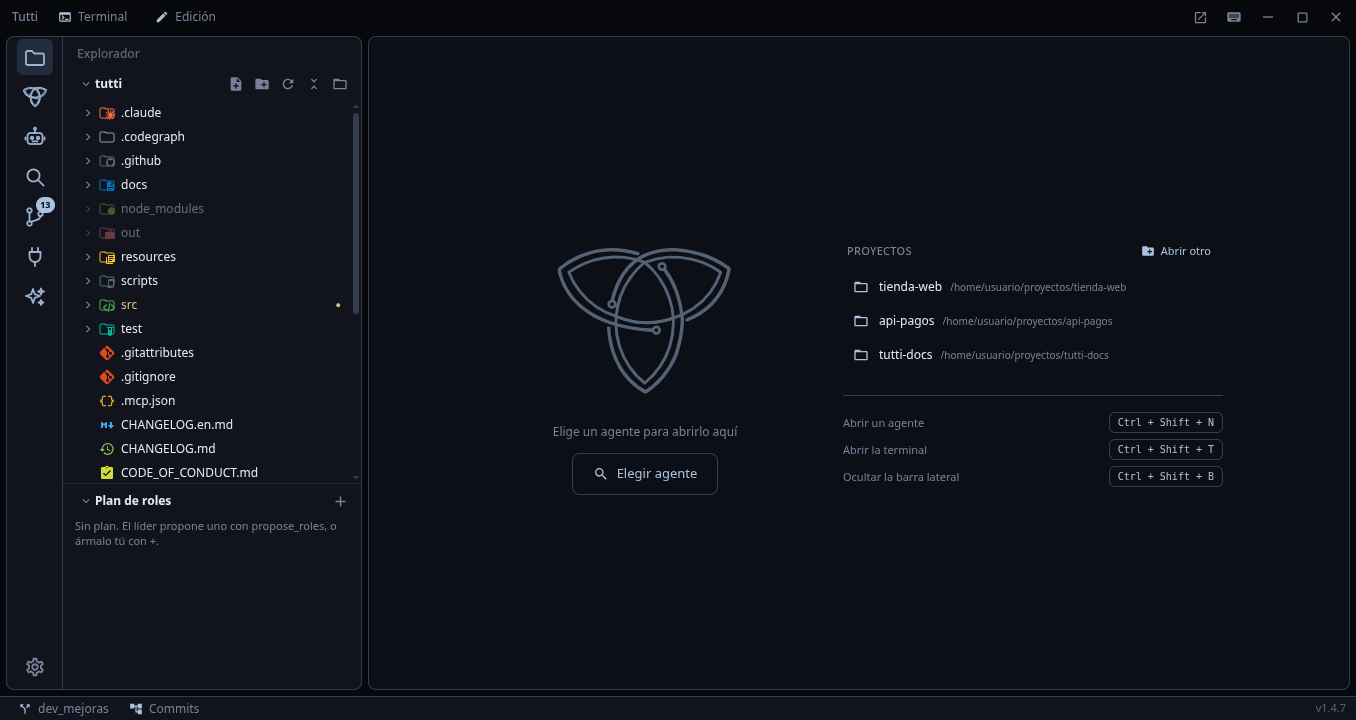
With no agents open, the central area is the start screen: the Choose agent button, the basic shortcuts and your recent projects (with Open another and an ✕ to remove one from the history). If you open a file with no agents, the editor takes all the space. F1 shows the full list of shortcuts.
The window
| Area | What it contains |
|---|---|
| Title bar | Terminal, current branch, edit permission, commits, version, update button, new window and shortcuts |
| Sidebar | Files, Search, Agents, Git, Context, MCP and Usage; at the bottom, the settings gear |
| Center | Tabbed editor on the left and the agents in a grid on the right |
| Bottom panel | The terminals, with their list on the right when there are several |
The sidebar folds to icons only with Ctrl+Shift+B or by double-clicking an icon. Dividers can be dragged to resize.