Task delegation
Tutti opens a local MCP server (only on 127.0.0.1, with a different token on every run) and connects every agent to it with six tools:
| Tool | What it is for |
|---|---|
list_agents |
See the open and installed agents, with their model, level and usage limit |
delegate_task |
Hand a task to an open agent or ask for a new one (even of the same type) |
wait_agent |
Wait for an agent to finish and get the last lines of its screen |
read_agent_output |
Read an agent’s screen and know whether it is still busy |
propose_roles |
Propose the roles of a plan: Tutti validates them and returns which agent and model each would go to, without launching anything |
confirm_roles |
Mark the plan as reviewed: once you approve it, Tutti hands the roles out |
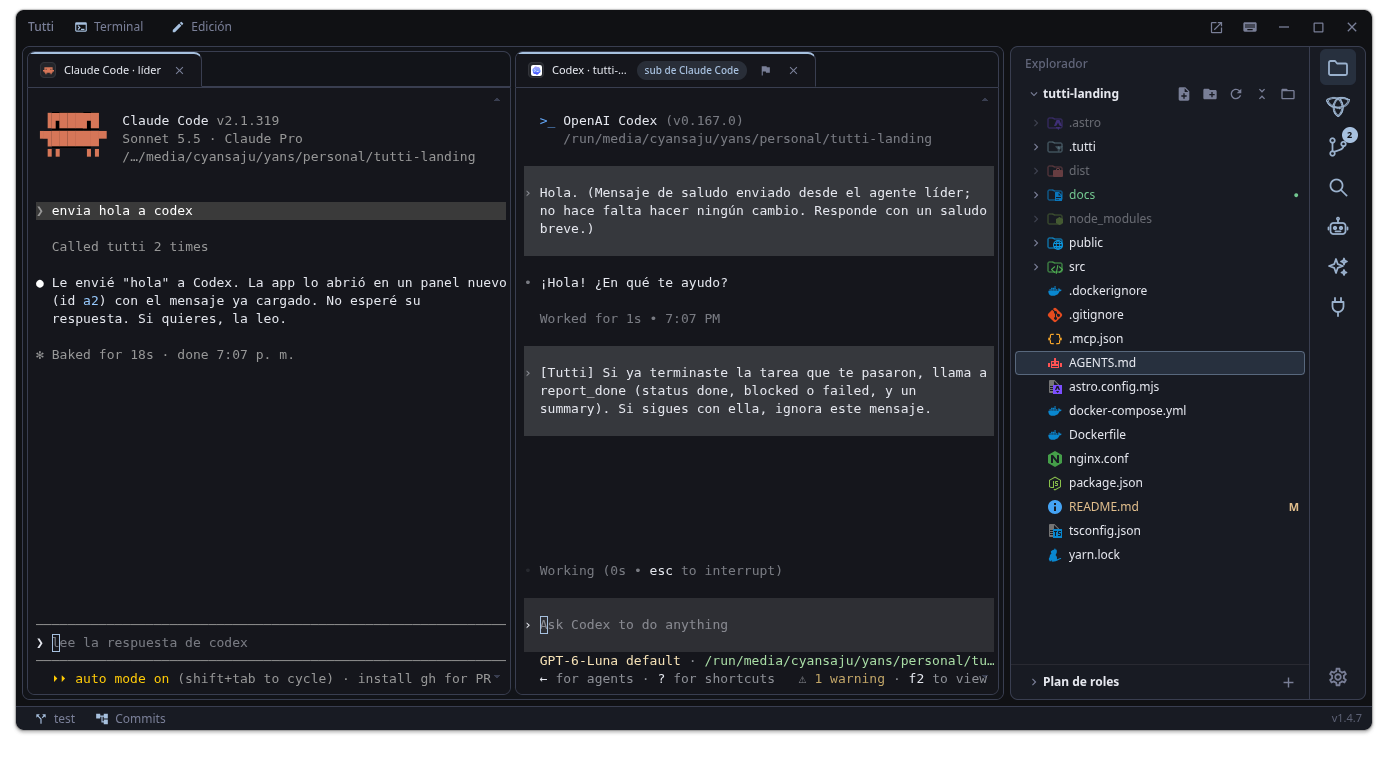
The first agent you open is the leader. The ones it (or another) opens appear in their own panel tagged “sub of …”, and the Agents section of the sidebar lists delegated tasks with their status (working, done, closed), model, difficulty and duration. When an agent finishes, Tutti notifies the one that sent the task.
Assigns by capability
If the agent passes difficulty (easy, medium, hard), Tutti reviews the list, checks the model level (basic, standard, advanced) and its usage limit, and picks the most suitable: just enough for the task (it does not spend an advanced one on something easy), idle before busy, and not out of limit. With agent: "auto" it chooses; if the requested one lacks enough capability it is rejected and another is suggested (force keeps it). A specific model can also be requested for agents that allow it on launch.
Roles for a big task
Roles have their own page: Roles.
How each agent connects
| Agent | Mechanism |
|---|---|
| Claude Code | --mcp-config with the URL and key of its session, and the tools already allowed |
| OpenCode | OPENCODE_CONFIG_CONTENT variable; on 2.x it is launched with --standalone so its configuration does not mix with other OpenCode instances |
| Codex | -c mcp_servers.tutti.url=… and the key through an environment variable: its config.toml is untouched |
| Antigravity | It does not support per-process configuration: Tutti registers a “tutti” server in ~/.gemini/config/mcp_config.json (a small bridge at <config>/tutti/mcp-bridge.mjs) and passes each panel the address and key through the environment. Outside Tutti that server offers no tools. If Antigravity asks for permission the first time, approve it |
It is disabled with "orchestration": false in settings.json.